

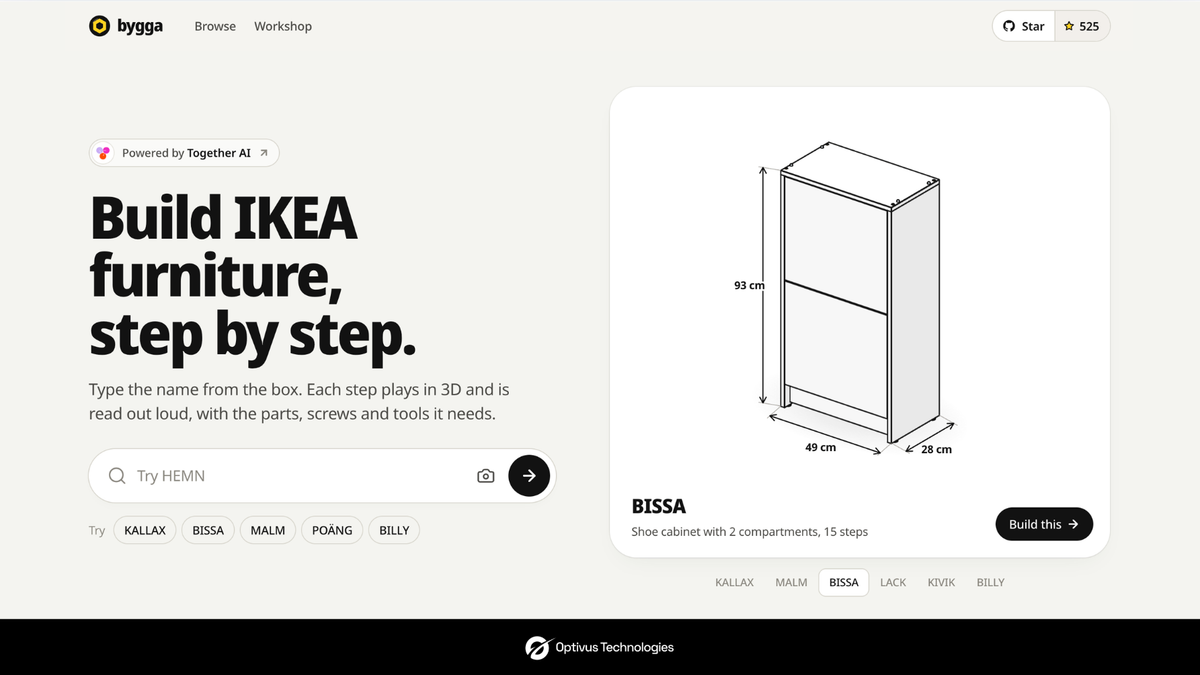
You know the scene. Box open, panels leaning against the sofa, a little bag of screws that all look the same. The booklet shows a cartoon man pointing at something, and you can't tell if that panel faces in or out, or how far the dowel is meant to go.
Bygga is a small web app made for exactly that moment. You type in the name from the box and it walks you through the build in 3D: which parts, which screws, which tools, one step at a time. It even reads each step out loud.
So, what is it?
Bygga is a free website that takes IKEA's paper instructions and rebuilds them as 3D guides. Right now it covers 1,223 products, everything from a LACK side table to a BRIMNES wardrobe. You don't sign up and you don't download anything. You just open it in your browser.
IKEA leaves words out of its booklets on purpose, so the same manual works in every country. Smart for IKEA, a little rough on the rest of us. Bygga goes after the questions everyone ends up asking anyway. Two of which piece? Which way round? How far does this go in? Every part is lettered and counted, you can spin each step to see it from any angle, and there are close-ups for the fiddly bits.
It was made by two developers, Hassan (@nutlope) and Youssef (@YoussefUIUX). It runs on Together AI, and the code is open on GitHub if you want to poke around. One thing worth knowing: it's an independent project, and IKEA isn't involved.
How it works
Using it is about as simple as it gets. You type the name from the box label (KALLAX, say) or the article number printed under it. Or you just take a photo of the label.
Next you get a checklist of tools and parts. If everything's there, one tap and you're off. If something's missing, Bygga tells you what to do about it.
Then you build. Each step plays as a short 3D animation with the screws shown up close, and you can drag the model around to look at it from the back or underneath.
The bit we liked most is that it talks. Each step is read out loud, so you aren't putting a panel down every thirty seconds to check your phone. It also tells you roughly how long you're in for: about 10 minutes for a LACK table, 40 for a KALLAX 2×2, a couple of hours for a MALM bed frame. Handy to know before you start at 9pm.
Who's it for?
Pretty much anyone whose heart has ever sunk a little at the sight of a flat-pack box. Students moving into their first place. Someone putting a wardrobe together alone on a Sunday. People who'd rather see and hear how something goes together than squint at a drawing.
What you get out of it is simple. Fewer mistakes, fewer panels on backwards, less unscrewing and starting over. And since it's free and there's no account, there's not much reason not to try it next time.
Why we're writing about it
At Optivus Technologies we spend a lot of time thinking about how AI should actually show up in products. Bygga gets it right, and a big part of that is you barely notice the AI. Nobody asks you to write a prompt. It just makes an annoying job less annoying.
If you build digital products, there's a lot worth borrowing here.
It starts with a problem people really have. Nobody needed convincing that IKEA manuals can be confusing.
It asks for things you already have in front of you. A word on a box, a number, a photo. That's all.
And it thinks about where you'll be when you use it. You're on the floor holding a panel and an Allen key, so it reads the steps to you. That's designing for the real situation, not just the screen.
None of this is really about furniture. Think about equipment setup, field service manuals, staff onboarding, product support. Most of it still lives in PDFs and printed guides that people skim, get lost in, and give up on. Plenty of it could work the way Bygga does.
If your team has documentation that customers or staff struggle with, we'd be glad to talk about what it could look like. And next time there's a flat-pack box in your hallway, give Bygga a go.
Bygga is an independent project and is not affiliated with Optivus Technologies or IKEA.