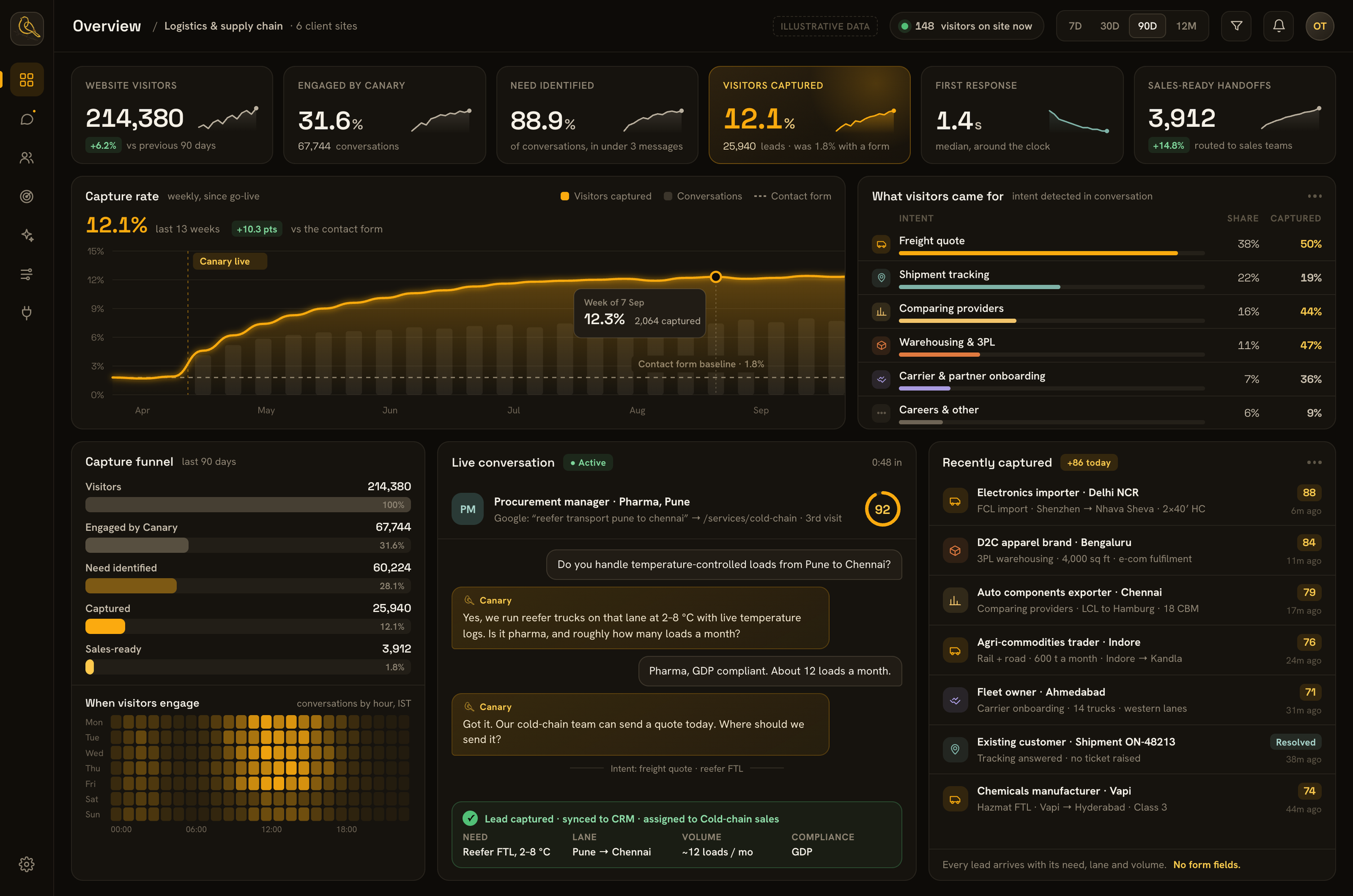
The challenge
A logistics website serves very different visitors. A shipper wants a quote. An existing customer wants an update. A procurement team is comparing providers. A potential partner is checking capabilities.
Each of them needs something different from the same website:
- Shippers want to know whether a provider covers their lane, mode and volume, and what it will cost.
- Existing customers want a shipment status or a document, not a sales conversation.
- Procurement teams want evidence of coverage, capacity and compliance before they shortlist anyone.
- Carriers and partners want to know how to start working with the business.
Most of them leave without making contact. A generic contact form asks every visitor the same questions, whatever they came for. It cannot tell a shipper who is ready to book from someone who is just browsing, and it collects none of the detail a sales team needs to respond: the lane, the mode, the volume or the timing. The demand these companies had already paid to attract was slipping away.
What we built
We built Canary to change how these websites respond to visitors. Instead of pushing everyone through the same form, Canary:
- Engages visitors while they are on the site
- Works out what each visitor is looking for
- Responds to that specific need
- Captures the visitor so the client's team can follow up
We adapted Canary to each client's services and customers, so it speaks to the way their buyers actually look for logistics and supply chain providers.
In practice, every conversation follows the same four steps:
- It engages the visitor. Canary starts a conversation while the visitor is still on the site, instead of waiting for them to find and fill in a form.
- It identifies the need. Within the first few messages, Canary works out whether the visitor wants a quote, an update, a comparison or a partnership.
- It asks only what that need requires. A quote request gets questions about the lane, mode, volume and timing. A procurement team gets answers about coverage and capabilities. An existing customer is pointed to the right update rather than a sales form.
- It captures and routes the lead. The visitor's details and need go to the right team, with the conversation attached, and into the client's CRM.
What the client's team receives
A form gives a sales team a name, an email address and, at best, a line of free text. A lead captured by Canary arrives with the full picture: what the visitor needs, the lane and volume where they apply, how ready they are to buy, and the conversation that led there.
That means the first reply can be a relevant answer instead of a round of questions, and enquiries reach the person who can act on them.
Results
Across our logistics and supply chain clients, Canary captured 12% of website visitors. These were visitors who would otherwise have left without the business ever knowing they had been there.
Each of those visitors arrived with their need already identified, so the client's team could follow up with a relevant response rather than a generic reply. The conversations also showed each client what their visitors were actually asking for, from the services and lanes in demand to the questions buyers raised before getting in touch.
Why it worked
- Built for logistics buyers. Canary was designed around how shippers, customers and procurement teams search for providers, and it understands the way they describe what they need: lanes, modes, volumes and transit times.
- Adapted to each client. Every deployment reflected that company's services and customers rather than a generic script, so its answers matched what that client actually offers.
- Responds to the visitor's need. Visitors got a relevant response, not a one-size-fits-all form. That relevance is what turned a visit into a conversation, and a conversation into a lead.
- Every lead arrives ready to act on. Because the need and the context come with every lead, the client's follow-up starts where the conversation ended.